Service & API
This section describes the deployed translation service: the Docker pipeline, the service pipeline schema, and the public API contract.
Service pipeline
The Docker deployment is the reproducible runtime for the translation service.
It is defined in demo_n_api/docker-compose.yml and runs three cooperating
services:
appbuildsdemo_n_api/app/Dockerfileand runs the Flask application on port8080inside the container.dbruns MySQL 5.7, creates theansdatabase fromdemo_n_api/db/init.sql, and stores user accounts, expert suggestions, and terminology rows.caddyterminates HTTPS, validates client certificates for API routes, and reverse-proxies valid requests toapp:8080.
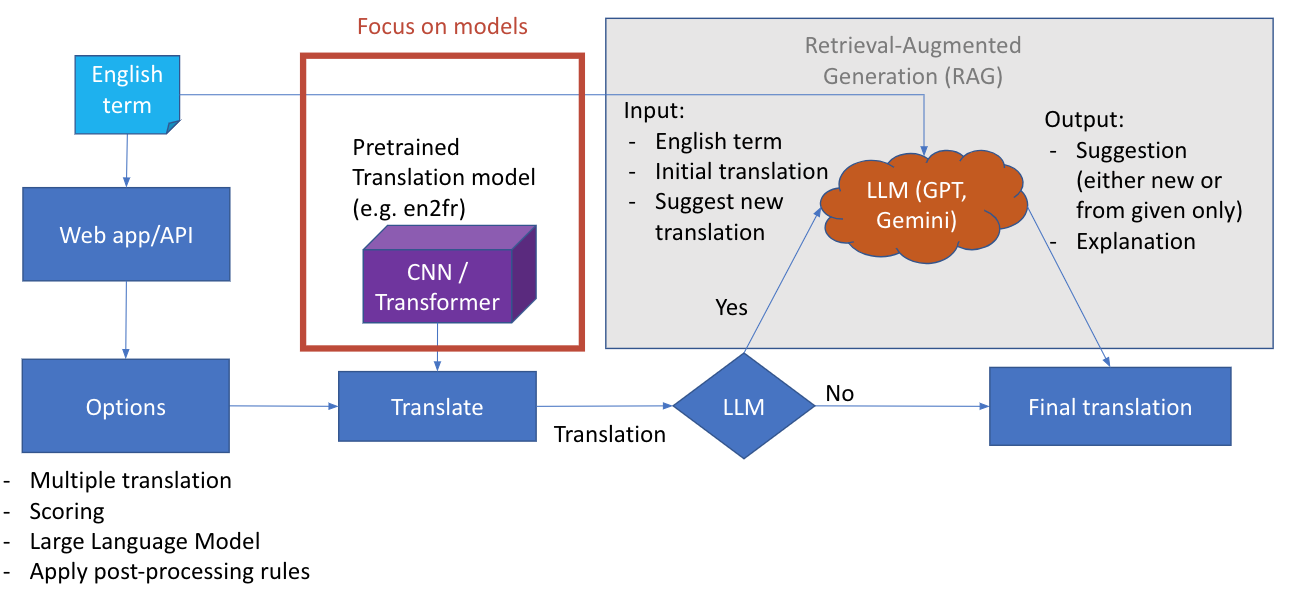
Pipeline schema
The diagram presents the runtime decision flow for a translation request:
An English term enters through the web app or API.
The caller selects options such as multiple translations, scoring, LLM refinement, and postprocessing rules.
The selected translation model produces the first machine translation. In the current service this is the NLLB model checkpoint configured by
NLLB_MODEL_EN_FRor by the request-levelmodel_id.If LLM refinement is disabled, the model output becomes the final translation after scoring and terminology highlighting.
If LLM refinement is enabled, the source term, initial translation, and refinement instruction are sent to the configured LLM provider.
The LLM returns a suggested final translation and an explanation. The service includes this information in the response instead of silently replacing the model output.
The grey Retrieval-Augmented Generation area shows the optional LLM/RAG-style step. It receives structured context from the API request and the initial NLLB translation. The “Focus on models” box shows the core model-serving part of the pipeline: the web service remains stable while the deployed checkpoint can be changed through configuration.
Runtime inputs
The application container mounts the runtime inputs needed for reproduction:
model files under
/app/models;environment configuration from
demo_n_api/.env;database initialization files from
demo_n_api/db;optional credential files from
demo_n_api/credentials;mTLS certificates for Caddy from
demo_n_api/mtls.
Startup sequence
Docker Compose builds the Flask image from
demo_n_api/app/Dockerfile.The image installs
demo_n_api/app/requirements.txtand startsflask run --host=0.0.0.0 --port=8080.MySQL starts first and executes
demo_n_api/db/init.sql.The Flask app loads environment values from
demo_n_api/.envand initializes the globalTranslatorobject.The translator loads the default NLLB model path configured by
NLLB_MODEL_EN_FRandNLLB_MODEL_FR_EN.On the first terminology lookup, the app ensures that the configured terminology table exists and can load rows from
TERMINOLOGY_CSV_PATH.Caddy exposes the public HTTPS endpoint, adds mTLS identity headers for requests with a trusted client certificate, and forwards accepted API calls to the Flask app.
Translation request flow
The main API path is /translate. A request can provide terms as JSON or
upload a text file where each non-empty line is one term. The processing order is:
Authenticate the caller using
api_key,mtls, orapi_key_or_mtls.Normalize request options:
direction,model_id,multiple,similarityMetric,llm,llmProvider,llmModel, andreturnFile.Parse terms from JSON, form data, query parameters, or uploaded file lines.
Reject terms that exceed
MAX_TERM_WORDS.Run Presidio sensitive-data detection. Sensitive batches return HTTP 422 and are not translated.
Translate each accepted term with NLLB using the selected direction and model.
Compute token-level confidence and expose it as
trust_scoreandmean_conf_prob.Find terminology matches in the generated translation and add
highlights.Adjust the trust score with terminology coverage when matches are available.
If
multiple=true, generate up to ten candidate translations.If
similarityMetric=true, compute semantic similarity between the source term and the generated translation.If
llm=true, call the configured LLM provider for suggested refinement and explanation.Return JSON with
countanditems, or a downloadable text file whenreturnFile=true.
Reproducing the service
For local reproduction, publish the Flask app port in the app service:
ports:
  - "8080:8080"
Start the app and database:
cd demo_n_api
docker compose up --build app db
Then test a local request:
curl.exe -X POST http://localhost:8080/translate `
  -H "Content-Type: application/json" `
  -H "X-API-Key: replace-with-local-development-key" `
  -d "{\"terms\":[\"heart failure\"],\"direction\":\"en_fr\"}"
For a public HTTPS/mTLS deployment, keep Caddy enabled, provide
demo_n_api/mtls/ca.crt, set a real APP_HOST and ACME_EMAIL, and set
API_AUTH_MODE=mtls or API_AUTH_MODE=api_key_or_mtls.
Translate endpoint
Base endpoints:
Local development:
http://localhost:8080/translatePublic HTTPS deployment:
https://anstranslation2.ddns.net/translate
Request fields:
terms: list of terms to translate. For a single term, still send a one-item list.direction: translation direction. Supported values areen_frandfr_en.model_id: optional model checkpoint path or Hugging Face identifier.multiple: whentrue, return candidate translations.similarityMetric: whentrue, include semantic similarity fields.llm: whentrue, request LLM-based refinement and explanation.llmProvider: provider name whenllmis enabled, for examplegeminioropenai.llmModel: optional provider-specific model override.returnFile: when file input is used, return output as a file payload.
Example call with mTLS
curl -v 'https://anstranslation2.ddns.net/translate' \
  --header 'Content-Type: application/json' \
  --data-raw '{
    "terms": ["heart failure", "respiratory distress"],
    "llm": false,
    "direction": "en_fr",
    "model_id": "/app/models/checkpoint-16539",
    "similarityMetric": true,
    "multiple": true,
    "returnFile": false,
    "llmProvider": "",
    "llmModel": ""
  }' \
  --cert ./mTLS/client.crt \
  --key ./mTLS/client.key \
  --cacert ./mTLS/ca.crt
The JSON responses shown below (through the end of this page) were captured by running the corresponding calls against a live instance of this service — they are real output, not illustrative samples. Each call is shown in the public HTTPS/mTLS form documented above; verification was done against the Flask app with the same authenticated identity Caddy forwards for a trusted mTLS connection, so the response bodies are identical to what a real mTLS client receives.
Minimal single-term example
Request:
curl -s 'https://anstranslation2.ddns.net/translate' \
  --header 'Content-Type: application/json' \
  --data-raw '{
    "terms": ["heart failure"],
    "direction": "en_fr"
  }' \
  --cert ./mTLS/client.crt \
  --key ./mTLS/client.key \
  --cacert ./mTLS/ca.crt
Output (HTTP 200):
{
  "count": 1,
  "items": [
    {
      "input": "heart failure",
      "index": 0,
      "output": "insuffisance cardiaque",
      "direction": "en_fr",
      "model_id": "/app/models/checkpoint-16539",
      "trust_score": 1.0,
      "mean_conf_prob": 0.995455,
      "highlights": [
        {
          "start": 0,
          "end": 22,
          "translation": "insuffisance cardiaque",
          "trustScore": 0.993407,
          "matches": [
            {
              "source": "https://smt.esante.gouv.fr/explorer-les-concepts/terminologie-cim-10/?concept=http%3A%2F%2Fdata.esante.gouv.fr%2Fatih%2Fcim10%2FI50&lang=fr&treeViewType=simple",
              "terminology": "CIM 10 PMSI",
              "conceptUri": "http://data.esante.gouv.fr/atih/cim10/I50",
              "id": "I50",
              "theme": "I30-I52 Autres formes de cardiopathies",
              "nearTerms": []
            },
            {
              "source": "https://smt.esante.gouv.fr/explorer-les-concepts/terminologie-cim11-mms/?concept=http%3A%2F%2Fid.who.int%2Ficd%2Frelease%2F11%2Fmms%2F1458683894&lang=fr&treeViewType=simple",
              "terminology": "CIM-11 MMS",
              "conceptUri": "http://id.who.int/icd/release/11/mms/1458683894",
              "id": "BlockL1-BD1",
              "theme": "block",
              "nearTerms": []
            },
            {
              "source": "https://smt.esante.gouv.fr/explorer-les-concepts/terminologie-ncit/?concept=http%3A%2F%2Fncicb.nci.nih.gov%2Fxml%2Fowl%2FEVS%2FThesaurus.owl%23C50577&lang=fr&treeViewType=simple",
              "terminology": "NCIt",
              "conceptUri": "http://ncicb.nci.nih.gov/xml/owl/EVS/Thesaurus.owl#C50577",
              "id": "C50577",
              "theme": "C35741 trouble non-néoplasique cardiaque",
              "nearTerms": []
            },
            {
              "source": "https://smt.esante.gouv.fr/explorer-les-concepts/terminologie-snomed-ct-fr/?concept=http%3A%2F%2Fsnomed.info%2Fid%2F84114007&lang=fr&treeViewType=simple",
              "terminology": "SNOMED CT",
              "conceptUri": "http://snomed.info/id/84114007",
              "id": "84114007",
              "theme": "",
              "nearTerms": []
            }
          ]
        }
      ]
    }
  ]
}
Multiple terms in one request
Send several terms in the same terms array; each is scored and highlighted
independently and returned in the same order in items:
curl -s 'https://anstranslation2.ddns.net/translate' \
  --header 'Content-Type: application/json' \
  --data-raw '{
    "terms": ["heart failure", "asthma", "diabetes mellitus"],
    "direction": "en_fr"
  }' \
  --cert ./mTLS/client.crt \
  --key ./mTLS/client.key \
  --cacert ./mTLS/ca.crt
Output (HTTP 200, abridged — each item has the same shape as above):
{
  "count": 3,
  "items": [
    {"input": "heart failure", "index": 0, "output": "insuffisance cardiaque", "trust_score": 1.0},
    {"input": "asthma", "index": 1, "output": "asthme", "trust_score": 1.0},
    {"input": "diabetes mellitus", "index": 2, "output": "diabète sucré", "trust_score": 1.0}
  ]
}
Candidate translations (multiple=true)
curl -s 'https://anstranslation2.ddns.net/translate' \
  --header 'Content-Type: application/json' \
  --data-raw '{
    "terms": ["diabetes mellitus"],
    "direction": "en_fr",
    "multiple": true
  }' \
  --cert ./mTLS/client.crt \
  --key ./mTLS/client.key \
  --cacert ./mTLS/ca.crt
Output (HTTP 200) — each item gains a top_translations list of up to
ten scored candidates, ordered best first:
{
  "count": 1,
  "items": [
    {
      "input": "diabetes mellitus",
      "output": "diabète sucré",
      "trust_score": 1.0,
      "mean_conf_prob": 0.993861,
      "top_translations": [
        {"translation": "diabète sucré", "score": 1.0},
        {"translation": "sucré diabétique", "score": 0.699226},
        {"translation": "diabète sucrée", "score": 0.698371},
        {"translation": "sucre sucré", "score": 0.64033},
        {"translation": "diabetes mellitus", "score": 0.594149},
        {"translation": "diabètes sucrés", "score": 0.579666},
        {"translation": "diabétose sucrée", "score": 0.563762},
        {"translation": "type diabétique", "score": 0.548722}
      ]
    }
  ]
}
Semantic similarity (similarityMetric=true)
curl -s 'https://anstranslation2.ddns.net/translate' \
  --header 'Content-Type: application/json' \
  --data-raw '{
    "terms": ["heart failure"],
    "direction": "en_fr",
    "similarityMetric": true
  }' \
  --cert ./mTLS/client.crt \
  --key ./mTLS/client.key \
  --cacert ./mTLS/ca.crt
Output (HTTP 200) — adds semantic_similarity_score (cross-lingual
similarity between the source term and the translation) and
semantic_similarity_model:
{
  "count": 1,
  "items": [
    {
      "input": "heart failure",
      "output": "insuffisance cardiaque",
      "trust_score": 1.0,
      "semantic_similarity_score": 0.8298,
      "semantic_similarity_model": "sentence-transformers/paraphrase-multilingual-MiniLM-L12-v2"
    }
  ]
}
LLM refinement (llm=true)
curl -s 'https://anstranslation2.ddns.net/translate' \
  --header 'Content-Type: application/json' \
  --data-raw '{
    "terms": ["heart failure"],
    "direction": "en_fr",
    "llm": true,
    "llmProvider": "gemini"
  }' \
  --cert ./mTLS/client.crt \
  --key ./mTLS/client.key \
  --cacert ./mTLS/ca.crt
Output (HTTP 200) — adds llm_provider and an llm object with the
provider’s suggested translation and its reasoning. The model output itself
(output) is left unchanged; the LLM suggestion is additive:
{
  "count": 1,
  "items": [
    {
      "input": "heart failure",
      "output": "insuffisance cardiaque",
      "trust_score": 1.0,
      "llm_provider": "gemini",
      "llm": {
        "suggested": "insuffisance cardiaque",
        "reasoning": "The current translation 'insuffisance cardiaque' is the standard and most accurate medical term for 'heart failure' in French. It is widely recognized and used in medical contexts."
      }
    }
  ]
}
Reverse direction (fr_en)
curl -s 'https://anstranslation2.ddns.net/translate' \
  --header 'Content-Type: application/json' \
  --data-raw '{
    "terms": ["insuffisance cardiaque"],
    "direction": "fr_en"
  }' \
  --cert ./mTLS/client.crt \
  --key ./mTLS/client.key \
  --cacert ./mTLS/ca.crt
Output (HTTP 200):
{
  "count": 1,
  "items": [
    {
      "input": "insuffisance cardiaque",
      "direction": "fr_en",
      "output": "heart failure",
      "trust_score": 0.827668,
      "mean_conf_prob": 0.908154,
      "highlights": []
    }
  ]
}
File upload
Send a plain-text file (one term per line) as multipart form data in the
file field, alongside direction as a form field. Without
returnFile, the response is the same JSON batch shape as the JSON calls
above, one item per line:
printf 'heart failure\nasthma\ndiabetes mellitus\n' > terms.txt

curl -s 'https://anstranslation2.ddns.net/translate' \
  -F "file=@terms.txt" \
  -F "direction=en_fr" \
  --cert ./mTLS/client.crt \
  --key ./mTLS/client.key \
  --cacert ./mTLS/ca.crt
Output (HTTP 200, abridged to the same three items as the multi-term
example above):
{"count": 3, "items": ["...same item shape as the JSON examples above..."]}
Add -F "returnFile=true" to receive a downloadable results file instead of
JSON. For a .txt upload the response is Content-Type: text/plain with
one translation per line, in the same order as the input file:
curl -s 'https://anstranslation2.ddns.net/translate' \
  -F "file=@terms.txt" \
  -F "direction=en_fr" \
  -F "returnFile=true" \
  -OJ \
  --cert ./mTLS/client.crt \
  --key ./mTLS/client.key \
  --cacert ./mTLS/ca.crt
Response headers and body actually returned for the three-line file above:
HTTP/1.1 200 OK
Content-Disposition: attachment; filename=terms_translated.txt
Content-Type: text/plain; charset=utf-8

insuffisance cardiaque
asthme
diabète sucré
nearTerms resolved to a code
Each match’s nearTerms covers the synonyms of that matched concept
(its own french_synonyms), always rendered as
"code label" rather than bare text.
Each synonym resolves in one of two ways:
If the synonym text is itself a registered concept’s own French label somewhere in that terminology, it is shown as that concept’s own
"code label"— which may be a different code than the match it came from:curl -s 'https://anstranslation2.ddns.net/translate' \ --header 'Content-Type: application/json' \ --data-raw '{"terms": ["effects of thirst"], "direction": "en_fr"}' \ --cert ./mTLS/client.crt --key ./mTLS/client.key --cacert ./mTLS/ca.crt
Output (
HTTP 200): the CIM-10 matchT73.1and the CIM-11 MMS matchNF07.1both have a synonym meaning “water deprivation”, which is itself a registered code in each terminology (X54andXE3WSrespectively) — sonearTermsresolves each to that other code:{ "count": 1, "items": [ { "input": "effects of thirst", "output": "effets de la soif", "highlights": [ { "translation": "effets de la soif", "matches": [ { "id": "T73.1", "terminology": "CIM 10 PMSI", "theme": "T73 Effets d'autres privations", "nearTerms": ["X54 Privation d'eau"] }, { "id": "NF07.1", "terminology": "CIM-11 MMS", "theme": "", "nearTerms": ["XE3WS Privation d'eau"] } ] } ] } ] }
Otherwise — the common case, since most synonyms are free text with no code of their own anywhere in the terminology — it falls back to the code of the concept the synonym belongs to:
curl -s 'https://anstranslation2.ddns.net/translate' \
  --header 'Content-Type: application/json' \
  --data-raw '{"terms": ["breast"], "direction": "en_fr"}' \
  --cert ./mTLS/client.crt --key ./mTLS/client.key --cacert ./mTLS/ca.crt
Output (
HTTP 200, abridged): NCIt’sC12971(“Sein”) has the synonym “Seins”, which is not itself a registered NCIt concept, so it falls back toC12971’s own code:{ "count": 1, "items": [ { "input": "breast", "output": "sein", "highlights": [ { "translation": "sein", "matches": [ { "id": "C12971", "terminology": "NCIt", "theme": "C13018 Organe", "nearTerms": ["C12971 Seins"] } ] } ] } ] }
Response shape (JSON)
The endpoint returns a batch response with one item per accepted term. When the
translation matches entries of the terminology database, each matched span is
returned in highlights together with its terminology concepts. This is the
same shape shown in the examples above, repeated here as the full reference:
{
  "count": 1,
  "items": [
    {
      "input": "heart failure",
      "index": 0,
      "output": "insuffisance cardiaque",
      "direction": "en_fr",
      "model_id": "/app/models/checkpoint-16539",
      "trust_score": 1.0,
      "mean_conf_prob": 0.995455,
      "highlights": [
        {
          "start": 0,
          "end": 22,
          "translation": "insuffisance cardiaque",
          "trustScore": 0.993407,
          "matches": [
            {
              "source": "https://smt.esante.gouv.fr/explorer-les-concepts/terminologie-cim-10/?concept=http%3A%2F%2Fdata.esante.gouv.fr%2Fatih%2Fcim10%2FI50&lang=fr&treeViewType=simple",
              "terminology": "CIM 10 PMSI",
              "conceptUri": "http://data.esante.gouv.fr/atih/cim10/I50",
              "id": "I50",
              "theme": "I30-I52 Autres formes de cardiopathies",
              "nearTerms": []
            },
            {
              "source": "https://smt.esante.gouv.fr/explorer-les-concepts/terminologie-snomed-ct-fr/?concept=http%3A%2F%2Fsnomed.info%2Fid%2F84114007&lang=fr&treeViewType=simple",
              "terminology": "SNOMED CT",
              "conceptUri": "http://snomed.info/id/84114007",
              "id": "84114007",
              "theme": "",
              "nearTerms": []
            }
          ]
        }
      ]
    }
  ]
}
Item fields:
input/index: the submitted term and its position in the request.output: the translation.trust_score: combined confidence and terminology-coverage score (0-1).mean_conf_prob: mean token confidence reported by the model.error: only present when this term failed; the other terms of the batch are still translated and returned.
Highlight fields (one entry per matched span of the translation):
start/end/translation: character span and matched text.trustScore: confidence for this span.matches: terminology concepts matching the span, with:source: link to the concept page in the SMT concept explorer.terminology: terminology name (for exampleCIM 10 PMSI,SNOMED CT,NCIt,LOINC).conceptUri: URI of the concept.id: concept code in its terminology.theme: parent category, ascode labelwhen the label is known (for exampleI30-I52 Autres formes de cardiopathies), the bare code when no label resolves, or""when the terminology has no category data at all (always empty for SNOMED and ICF).nearTerms: French synonyms of this concept, each resolved to"code label"(see nearTerms resolved to a code above) — never bare text. Empty when the concept has no synonym data at all. Most terminologies have sparse or no synonym data — SNOMED, LOINC, ATC, EMDN, ORDO, ICF and STANDARD_TERMS rarely populate this field.
.xlsx workbooks (one term per row, first non-empty cell) are also
accepted in the file field. With returnFile=true an .xlsx upload
returns a .xlsx results file with the columns term, translation,
trust score, terminology matches, theme, near terms,
SMT links and error — terms that fail (including sensitive-data terms)
keep their row with the error message while the rest of the file is
translated.
Status codes
200: translation succeeded.400: invalid request, missing terms or file, unsupported upload format, empty uploaded file, or term length aboveMAX_TERM_WORDS.401: missing or invalid API key or mTLS identity.422: sensitive data detected by Presidio in a JSON batch; blocked items are reported inviolations. File requests withreturnFile=truereturn the results file with per-term errors instead.
Real responses for each error case:
401 — no API key / no mTLS identity presented:
curl -s 'https://anstranslation2.ddns.net/translate' \
  --header 'Content-Type: application/json' \
  --data-raw '{"terms": ["heart failure"], "direction": "en_fr"}'
{"error": "Unauthorized. Provide a valid mTLS client certificate."}
HTTP 401
400 — unsupported direction value:
curl -s 'https://anstranslation2.ddns.net/translate' \
  --header 'Content-Type: application/json' \
  --data-raw '{"terms": ["heart failure"], "direction": "de_en"}' \
  --cert ./mTLS/client.crt --key ./mTLS/client.key --cacert ./mTLS/ca.crt
{"error": "Invalid direction. Supported values: en_fr, fr_en."}
HTTP 400
422 — sensitive data detected by Presidio:
curl -s 'https://anstranslation2.ddns.net/translate' \
  --header 'Content-Type: application/json' \
  --data-raw '{
    "terms": ["My name is John Smith and my email is john.smith@example.com"],
    "direction": "en_fr"
  }' \
  --cert ./mTLS/client.crt --key ./mTLS/client.key --cacert ./mTLS/ca.crt
{
  "count": 1,
  "error": "Unprocessed Entity: term includes sensitive data",
  "message": "term includes sensitive data",
  "items": [
    {
      "index": 0,
      "input": "My name is John Smith and my email is john.smith@example.com",
      "output": "Unprocessed Entity: term includes sensitive data",
      "message": "term includes sensitive data",
      "entities": ["EMAIL_ADDRESS", "PERSON"]
    }
  ],
  "violations": [
    {
      "index": 0,
      "term": "My name is John Smith and my email is john.smith@example.com",
      "entities": ["EMAIL_ADDRESS", "PERSON"]
    }
  ]
}
HTTP 422
Health endpoint
GET /health reports service and database status without authentication.
curl -s 'https://anstranslation2.ddns.net/health'
Output when healthy (HTTP 200):
{
  "app": "ok",
  "database": "ok",
  "database_bootstrapped": true,
  "terminology_rows": 493055
}
When the database is unreachable, the endpoint returns HTTP 503 with a
database_error message instead (illustrative example, based on an actual
outage previously seen on this deployment when the ans database was
missing):
{
  "app": "ok",
  "database_bootstrapped": false,
  "database": "error",
  "database_error": "(1049, \"Unknown database 'ans'\")"
}
HTTP 503
Suggestion endpoints
The service also exposes endpoints used by expert review workflows. Both
endpoints use the same authentication layer as /translate (api_key,
mtls, or api_key_or_mtls depending on API_AUTH_MODE), and both
also accept an authenticated browser session, in which case user defaults
to the logged-in username instead of "api_key_user".
POST /store
Stores an expert-provided suggestion for a source term and its machine
translation. Required JSON fields: text (source term), trans (the
machine translation being reviewed), sugg (the expert’s suggested
translation). Optional: user (defaults to the authenticated identity).
curl -s 'https://anstranslation2.ddns.net/store' \
  --header 'Content-Type: application/json' \
  --data-raw '{
    "text": "heart failure",
    "trans": "insuffisance cardiaque",
    "sugg": "défaillance cardiaque"
  }' \
  --cert ./mTLS/client.crt --key ./mTLS/client.key --cacert ./mTLS/ca.crt
Output (HTTP 200, plain text body):
Done!!
POST /get_suggestion
Returns the most recently stored suggestion for a source term (by insertion
order, most recent first), or an empty string when none was ever stored.
Required JSON field: text.
curl -s 'https://anstranslation2.ddns.net/get_suggestion' \
  --header 'Content-Type: application/json' \
  --data-raw '{"text": "heart failure"}' \
  --cert ./mTLS/client.crt --key ./mTLS/client.key --cacert ./mTLS/ca.crt
Output when a suggestion exists (HTTP 200):
{"result": "défaillance cardiaque"}
Output when no suggestion was ever stored for that term (HTTP 200):
{"result": ""}